Friday, 27 February 2015

SteelSeries Siberia Elite Prism Headset Review!


 Purchase Link: http://bit.ly/cceliteprism

The SteeSeries Siberia Elite Pros, features superior sound, incredible comfort and high-end features that make it the ultimate choice in gaming headsets. SteelSeries took everything that was loved about the original, award-winning Siberia Elite and made it even better. Significant upgrades, both inside and out, make the Elite Prism everything you could ask for in a deluxe, competition-grade headset. 


Design:
Packaged in a much more deluxe box to its V3 smaller sibling the Siberia Elite Prism is all-round headset packed into a comically large design. There’s no shortage of praise for the build quality of the Elite Prism (as we’ve now come to expect as a standard feature from SteelSeries headsets).
Be aware, wearing this headset will make people look at you and giggle. The oversized yet extremely comfortable cups do add a bit of humour to the design and does look slightly distracting on ones head. If you wear these on public transport be careful not to smack another commuter across the face with the ever so large cups. The size of the Elite Prism is a bit larger than the V3 so larger heads should be ok with the sizing but it could have used a little bit extra just to make it sit just a tad bit better on your head.
 
The LED lighting effects can be controlled via the SteelSeries Engine 3 to go between numerous options, including ones that were left out of the Siberia V3 for some reason including Breathing & Volume Triggered. The software itself has a very clean interface and easy to navigate with simple and quick EQ controls and mic settings with added Dolby Headphone option.

Performance:
This is where the Siberia Elite Prism takes charge after the Siberia V3. The sound quality is much more balanced and offers great response over all frequencies but it does require a firmware update (sound was pretty awful before the firmware update) which was done all through the SteelSeries Engine 3, which leads me to add the SteelSeries Engine has got to be one of the best software packaged I’ve come across for products like these. Gaming products tend to have very flamboyant and excessively designed interfaces that just plain don’t work or is a nightmare to work in, the SteelSeries Engine however is extremely clean interface, simple to use and it just plain works as it shows. Kudos for SteelSeries on that one, it’s definitely something to consider when purchasing a USB-enabled headset (settings won’t take effect under 3.5mm connection).
 
Music, movies and games were all a pleasure to listen and with multiple plug options and adapters it is usable on platforms like Windows, Mac, iOS, Android and PS4. Bass on the Elite Prism is much more defined and cleaner than its V3 counterpart but lacks solid ear rumbling lows which for most should be still comfortable to listen on (EQ is there for that reason).
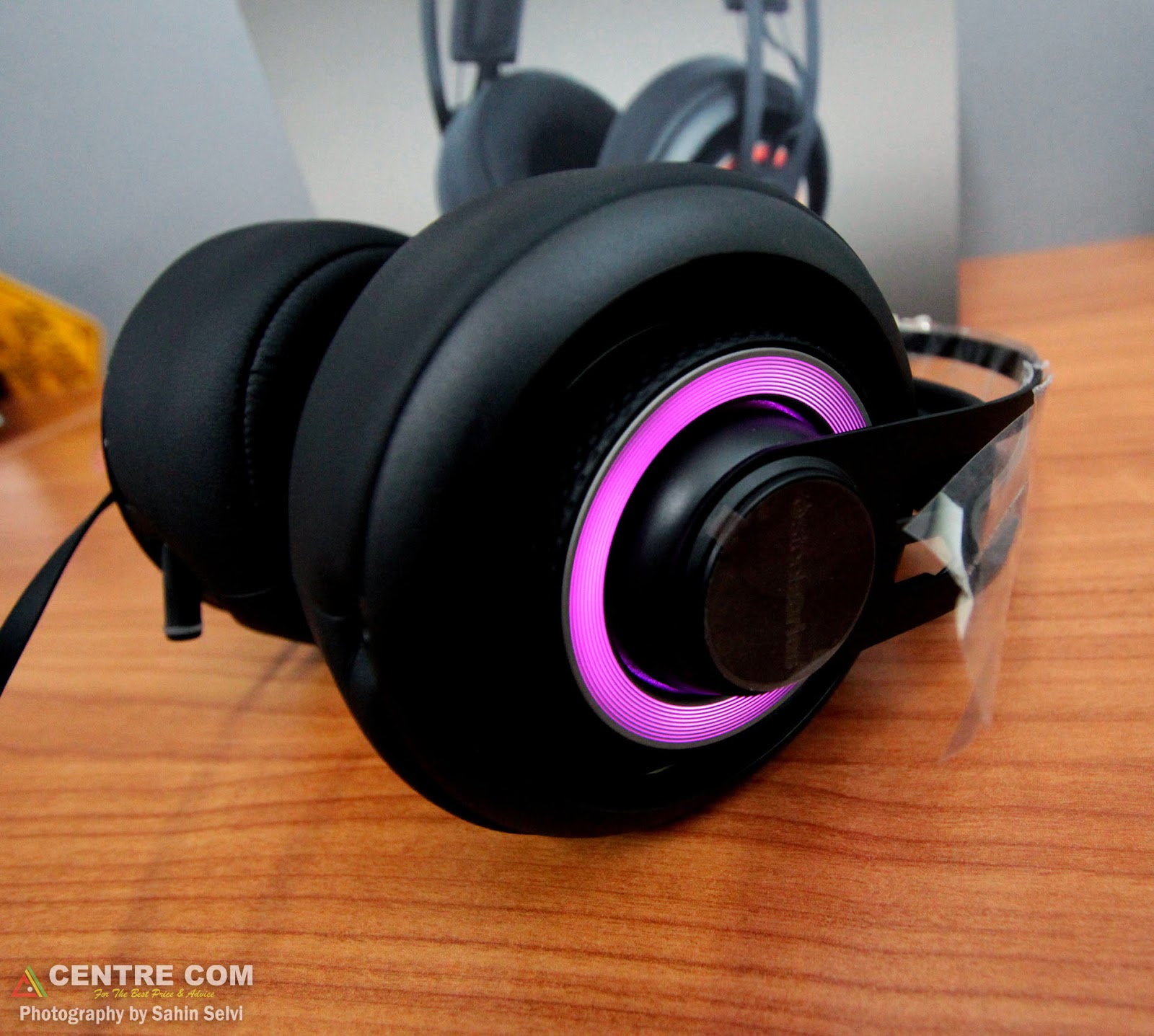
Running the headset off both the USB adapter on a PC and the 3,5mm off a FiiO X3 Player the headset performed pretty evenly and is a pretty ideal daily headset to use if you have the space to carry and pack it. It’s not foldable and does not come with a pouch or bag so you will need to consider storage before hauling it around places.

Conclusion:
For slightly less you get the Siberia V3 which drops on audio quality, the Siberia Elite Prism however is where the price difference kicks in and you get yourself a precisely crafted gaming headset. One thing I would say to SteelSeries is, drop the Dolby. It doesn’t really add anything necessary and the quality stereo setup of the headset is finely tuned enough to not need it. It is a precisely engineered piece of gear that is super comfortable and has the juice to make it a worthy investment choice.

Tuesday, 24 February 2015

SteelSeries Siberia V3 Prism Headset Review


Purchase Link:  http://bit.ly/ccv3prism

The SteeSeries Siberia V3 Prism features a newly-refined design that is both flexible and durable while still offering the legendary comfort of the Siberia series. The iconic Siberia suspension headband returns offering enduring, lightweight comfort for hours of gaming. Powerful, next-gen SteelSeries speaker drivers deliver rich, detailed sound for enhanced gameplay. Noise reducing memory foam ear cushions aid in isolating the natural sounds and powerful bass while keeping out outside noise. A retractable, flexible crystal-clear microphone can be muted with the flip of a switch behind the ear cup. A PC adapter and a universal 3.5mm plug means Siberia v3 plays nice on nearly all gaming systems and devices.


Design:
Super lightweight and a very high chance of good comfort, Unfortunately the 2nd part of that statement is left a bit short from me due to the fact the headband isn’t long enough for it to sit comfortable on my head. Around the office was a similar issue with the Siberia V3 more suited for younger gamers (or people with smaller heads than us here in the office). The cups themselves are very comfortable and will not distract you for lengthy listening periods. The build quality and overall design of the Siberia V3 is unchanged since its first iteration and continues to be top in its class.
The LED lighting effects can be controlled via the SteelSeries Engine 3 to go between a constant colour to an interchanging glow which cycles through different colours. The software itself has a very clean interface and easy to navigate with simple and quick EQ controls and mic settings.


Performance:
This is where the Siberia V3 is a bit of a letdown. The headphone lacks quality and clean lows and generally sounds a bit muddy listening to music and movies. It does a good job with games with the lack of a clean crisp sound often helping in the player getting a bit more immersed in the game. Compared to similar headphones around the $165 mark the Siberia V3 does fall short in performance at times. The lack of 3.5mm adapter also means you won’t be using these in your portable devices anytime soon. The microphone is good and should be a pretty sweet tool for gamers across multiple platforms (currently supports Windows, Mac and PS4)

 
Conclusion:
If you’re after a decent sounding headphone with 2nd to none comfort then the Siberia V3 is the one to consider. Although it does leave a desire for slightly more bass and overall cleaner sound if you want something strictly for gaming and need it to be as comfortable as possible for as long as possible then the V3 is where you should be putting your money.

Tuesday, 3 February 2015

MSI GT80 Titan SLI Laptop Review


On October 31st, 2014 MSI announced its latest gaming notebook dubbed the GT80. At first glance the unusual and different layout of the keyboard was an early indicator that this wasn’t going to be just an ordinary gaming notebook. Joint engineering with SteelSeries the MSI GT80 Titan is the world’s first notebook with a backlit mechanical keyboard fitted with Cherry switches. But it didn’t stop there, throw in dual NVIDIA GeForce GTX 980M and the best and latest mobile CPU from Intel.

There is no doubt that this is hands down the most powerful laptop on the market today. We’ll get to performance later but first let’s take a look at the specs on the highest model available.

Intel® Core™ i7-4980HQ 2.8GHz to 4GHz (i7-4720HQ Review Model)
32GB Memory (16GB Memory Review Model)
Dual NVIDIA GeForce GTX 980M 8GB SLI
18.4” Full-HD 1080p Anti-Reflective Display
SteelSeries Cherry MX Brown Backlit Keyboard (RED LEDs)
1TB Solid State Drive + 1TB Hard Drive (512GB SSD Review Model)
BluRay Writer
Windows 8
2 Years Warranty (Includes 1 Year Global)


We received an engineering sample from MSI so the packaging was pretty standard laptop style but I’m sure the full retail versions will offer much more to the customers who buy this beast!
With a screen sized 18.4” the GT80 Titan SLI is a big unit, but the screen size isn’t what makes it the monolithic size it is. The sheer parts inside this beast coupled with a mechanical keyboard makes it a beefy monster that will trouble the strongest of guys carrying it around.


The sides of the GT80 contain 5x USB3.0 ports, audio jacks and an optical output. Towards the back of the sides you’ll find two large vents which exhaust an incredible amount of air. Be sure to keep these vents cleared of any objects that aren’t fond of heat. The GT80 produces and incredible amount of heat but the cooling does an incredible job on getting all that hot air out.


Along the top you’ll find the SteelSeries mechanical keyboard with Cherry Brown switches which is my personal favourite switch so I did find it quite pleasing that they opted for browns. It gives you the tactile feel without the ‘click’ of Blues. The placement of the mechanical keyboard is towards the edge of the laptop to accommodate for the switches and plethora of hardware housed in the GT80. However, I did find the placement to heavily compliment the 18.4” sized display when gaming. It meant that you could comfortable sit back and game like you would using a standard keyboard and desktop with the 18.4” sized display perfectly coupling the distance you would normally be using the GT80. The 18.4” display is vibrant and good enough display for casuals and professionals; however with the dual 980M’s in here it would have been nice to have a 1440p display option (no 4K for me).
Next to the keyboard you’ll find a cleverly designed digital trackpad. When lit up the trackpad acts as a number pad, click the ‘NUM’ button on the trackpad and the lights turn off and it now acts as a mouse trackpad. The trackpad itself is a bit of an awkward location but with a laptop this size most users will find themselves using as USB or wireless mouse so it’s not really that big of a deterrent. Above the number pad are the only physical buttons with the power, GPU switch and fan controller. The fan controller only allows you to switch between full speed or auto control.


The rear of the unit keeps it basic with air vents on either side, 2 mini Display Ports, HDMI, Ethernet port and a large 4-pin power jack accompanied with a huge 360w power brick. The power brick is big and does get warm so always remember to keep it well ventilated. The lid is presented in a faux brushed aluminium and has a clean look to it, just be cautious though as many of the surfaces on the GT80 Titan is a magnet for fingerprints.  The back side of the display has a gently illuminated logo that adds a subtle classy touch to the overall design.
Back at the front of unit above the keyboard area you’ll find a removable cover that reveals just some of the powerful internals including the DVD drive, a 4x m2 SSD’s and a mechanical hard drive. You see glimpses of the GPU’s and CPU but all those components are revealed more on the bottom side of the unit.

The performance of this laptop is what makes it come to life. No matter what game I threw at it (aside from a few AAA titles) it managed to hold up ultra-graphics at comfortable 100fps+. Playing games on this laptop truly felt like a full desktop experience. It looked good and performed amazingly well. The concerning thing was the total underutilization of the GPU’s for most parts which can be partially put on lack of driver updates. In the coming months with NVIDIA’s strong driver support and updates I do expect the GT80 to push performance even more with future updates.
Gaming was comfortable and pleasantly comfortable with the large screen and mechanical keyboard, the laptop did remain pretty cool with GPU temps hovering around 70-75 degrees on load. The keyboard area remained cool with means you can game on the GT80 for prolonged times without the need to worry about sweaty palms. The placement of the keyboard is definitely a win for MSI and I would like to see more gaming focused laptops to adopt a similar style.

One of the key things MSI has done with the MSI GT80 Titan is open the path for future upgrades. With promised GPU upgrades for at least the next 2 GPU cycles you’re looking at a laptop than can last for a solid 5 years (if not, much longer). With most of the other internals being upgradeable or changeable it does give the customer pretty open options to play with.


The biggest and most talked about thing about the MSI GT80 Titan SLI however, is the price tag. At $6299 it’s priced as much as a small vehicle so you have to really ask yourself if this is something you actually need. For hard-core gamers or even people who do a lot of travelling and aren’t happy with their under $1000 modest laptop, this could be an option for you. Sure, it’s a massive investment, but some people do travel a lot and want that full gaming experience wherever they go. Unfortunately no other laptop other than the MSI GT80 Titan SLI will give you that. It simple is the most powerful and convenient gaming laptop on the market.


When doing these reviews I always ask myself what would I change if I were to build this from the ground up? Firstly, I’d stick with a single GTX 980M, which is a fair chunk of the price cut, a 1440p display and more basic storage options (standard SSD’s)
Sahin Selvi


Friday, 19 December 2014

MSI WS60 Workstation Laptop Review

Weighing in at just under 2KG’s, the MSI WS60 Workstation Laptop is aimed at those who need to run demanding software on the go, and while stationary. Let’s first take a look at the extensive specsheet of this powerhouse laptop.

Intel® Core ™ i7 4710HQ
Intel, HM87 Chipset
16GB DDR3L 1600MHz Memory
NVIDIA Quadro K2100M 2GB Workstation Card
15.6” WQHD+ IPS Display (2880x1620)
2x 128GB m2 SATA SSD In MSI Exclusive SuperRAID
1TB Hard Drive
SteelSeries Full-Colour Backlit Keyboard
6-Cell 4840mAh Battery
Price: $3299


I’ll start off on the display, because when you start it up for the first time it’s the first thing that immediately gives you that ‘wow’ factor. The huge resolution gives the end user an ample amount of real estate for work and play. You are going to need a super set of eyes or a good set of glasses at that resolution though, even with windows text scaling, every text does look very small in amongst all those pixels. Work applications like Maya, 3DS Max and even Photoshop are slightly immune to this problem but you may have troubles reading the screen with general web applications like reading the news or social media management, however I don’t expect many people who invest in this machine will use it for such small daily things!

Booting up the machine and logging in you’ll notice the slick black background with the big proclamation ‘Best Laptop for CAD & 3D Modelling’ and I will have to partially agree to that statement. Putting the internal specifications aside for a few minutes the WS60 is not just about function over form. It is able to pack all that power in a super thin, lightweight and stylishly modern enclosure. It is plastic all around but not that cheap skimpy one you would feel on the $300 laptops on the market. Sure, it would have been very nice to add in some aluminium or metal trimming or detailing but in its current state it is a very good looking laptop. Don’t let the thin and lightweight design put you off, even with the reduced footprint it does manage to stay relatively cool and quiet for most of the medium to heavy work I did. I only heard and felt the true heat of the laptop come out after a few renders in Maya.

The addition of the SteelSeries full colour backlit keyboard takes it to a whole new level of workstation laptops. No longer are we seeing those big bulky workstation laptops that require a two man team to carry around with dedicated trolleys to pull them around. A lot more style and thoughtful design is going into the higher end laptops and it’s definitely something pleasing to see. The keyboard does come with a full array of software that lets you control the backlights to an almost unlimited number of combinations, colours and even effects. For a laptop marketed towards a more professional and mature audience it’s definitely a nifty little addition. The keys and keyboard itself has a comfortable layout although they have moved around some of the keys like the ‘DEL’ button so I did find myself having to quickly skim my eyes over the keys to find what I was looking for at times. The better news is even under load I did not feel the heat of the machine coming up through the keyboard which meant I could comfortably continue to use the keyboard under load and not feel distracted by the heat.


 The performance of the laptop is written in the specs. Powered by a quad core i7 processor and a beefy Quadro K2100M workstation GPU this laptop will run and handle complex 3D files and CAD drawings with ease. There’s also sufficient amount of memory to keep you multi-tasking with ease and the super high resolution always comes in handy when working in creative. All that screen real estate is perfect for 3D scenes, video editing and even Photoshop.


At $3200, who is this laptop actually designed for? It’s a hard case to consider this laptop for gamers but if you’re in the business of design or architecture work and sometimes wish you had something you could carry around with you for those last minute touch-ups or to show off that master 3D file you’ve been working on on-the-fly in your next meeting, this is the laptop you want. It has the power, the performance and just enough battery while running heavy applications to get you through a meeting over an hour long. The super lightweight and thin design makes it easy to carry around anywhere you go.

Sahin Selvi
 

Tuesday, 11 November 2014

LG 34" 34UC97 Curved IPS Display Review

The LG 34” Curved IPS Display
Introduction
It’s finally here. That was my reaction on the arrival of the LG 34UC97 Curved Ultrawide Display. We’ve seen consumer TV’s with curved panels and now it’s time for the PC master race to take full advantage of all these pixels.


Packaging
The 34UC97 comes boxed up similar to any TV packaging you’ve come across the past few years. It’s shiny on the outside but pretty basic on the inside. Hard foam protection isn’t the greatest for such a delicate product and if I were to purchase this online, I’d definitely have a few nerves kicking in on how it will be handled if not packed properly.  It would have been nice to see LG adopt a similar concept to the packaging style used by Dell in their high end displays for ultimate panel protection.
Inside the box you’ll find the curved panel, leg support, back I/O cover, screws for fitting the leg to the panel, HDMI & DP cable along with the power brick and manual. Yes, this does come with an external power brick. A panel this size requires some serious juice from the wall.
Putting the panel together felt a bit old-school with the pieces fastened together with screws as opposed to the ‘insert and click’ option many other manufacturers are doing these days.
Once it’s all up and running though is where this display sits in its own category of awesomeness.

Display
There isn’t much to say about the quality of the panel apart from ‘it’s awesome’. The colourfully rich IPS panel will have you watching things over and over again in awe of the panel quality. Movies, games, photos and general usage just looks amazing with everything you do. The quality in the display gets a solid 10/10. There aren’t many more displays out there that look this good.
The UI is controlled by the awkwardly positioned analogue stick right below centre of screen. It works yes, but being right in the middle you do need to awkwardly shape your arm to get to it. If they stuck the stick somewhere along the right side of the panel, would’ve been no issues at all.


The ‘Curve’
What gives this monitor the ‘wow’ factor, is the curve. Even if that factor lasts for only 10min. it’s definitely a head turner and will attract the sharp eyes of almost anyone who sees it. It’s an eye opener of a feature, but sadly that’s all there really is to it. In my usage I found no benefits to the curve from daily usage. It didn’t really add a benefit to the way I work but it also doesn’t take anything away. The curve is also slightly interesting for the fact that no matter where you look at it from, either the top part of the screen, or bottom will show some horizontal distortion at certain angles. It can be a bit off putting doing regular things like reading and general web surfing. With games I didn't even notice a curve; it didn't add or take away anything from the experience aside from the amazing amount of pixels to play with.


Pixels
At 3440x1440, this is hands down the most productive display to work on, watch movies on, and if your GPU allows, the best gaming experience. I’ve been personally using Ultrawide Monitors for about a year now and I can’t imagine life without it. It adds a whole new level of productivity, an entirely new gaming experience and most of all for me, movies look incredible. With the 21:9 ultrawide ratio most movies will fill out the entire screen without any black borders. On the LG 34UC97 you not only get the wideness but the slight hint of curve which makes this in my opinion, The Best Display For Entertainment. There just is nothing that will give you the level of experience you get from the LG 34UC97 on any other display.
 
Games
I’m not a competitive person, I always prefer panel and picture quality over the speedy TN panels so for me, this was an incredible experience. Games like Civilisation 5, Cities XL and other ‘sim’ type games are made for displays like these. The extra pixels give you so much more to play with it is an incredible feeling. FPS games at ultrawide give you a bigger field of view and with the slight curve you do feel a bit more immersed in the action, though I did realize while playing fast paced action games you sometimes do completely forget and not notice the curve at all.


Overall, this is a new piece of tech that is somewhat appropriately priced. The good news is if you’re willing to pay the $1800, you aren’t going to be disappointed. Even if you get over the curve feature, the quality in this panel is what makes this monitor really stand out. With a whole lot of pixels it will easily be the monitor you will ever work / play on.

Wednesday, 5 February 2014

Linksys EA6800 AC1900 Smart WiFi Router

AC Routers have started flooding the market lately and today I'm taking a look at the Linksys EA6900 AC1900 Router promising consumers speeds up to 1900Mbps (600mbps for Wireless-N & 1300Mbps for Wireless-AC).


Setting up the EA6900, the device wasn’t too fond of my Home network and refused to be detected through wires. After eventually setting it up through my laptop the router was up and running. Looking over the design of the unit it’s fairly similar to previous models with the addition of a few subtle changes and the addition of the 3 antennas. One thing you will notice is the size of the router. It is quite large and if you’re planning to place it somewhere on your desk, you may need to rethink it.
Once setup the web GUI of the device is very friendly and almost every level of user should be able to navigate and make changes quite easily and comfortably. The device lets you manage and edit everything you need to in a router. By default both the 2.4GHz and 5GHz on the device come with the same network ID and password, so your device will connect to whichever one is at its best reach. This is something you may want to change and control so that you can manually manage what devices you have connect to which network. The router also has functionality of using your smartphone to access the routers settings via an account and the app.

Speed wise the EA6900 is the fastest router I’ve used on the 2.4GHz at close range. It easily surpasses anything I’ve used and beats my own wireless router that I use. Where it doesn’t do so well is in the distance. Head to head against my dedicated Wireless-N router, it performs on par. I didn’t really see an improvement of speed against my existing router using the EA6900. For the premium price tag on the device and the age gap difference between the routers I was expecting significant improvement on the wireless range and throughput.

The biggest downside to the unit is the amount of heat it generates. It’s definitely up there as one of the hottest I’ve held. Even after an hour or so of powering it on, it gets uncomfortably hot. So beware and ensure you’re router is placed in a well-ventilated area as it’s going to need it.

Overall, the Linksys EA6900 is a solid piece of hardware with powerful specs that does have a few minor issues going against it. Saying that, most issues should be fixed with firmware updates which I hope Linksys is working on. If you’re looking to future proof your Home or Office wireless network, the Linksys EA6900 is one to put on your consideration list.